
Imagine sending a text message to an assistant and asking it to book a trip, organise your calendar, send an email or remind you about an important task. Instead of opening several apps and doing everything yourself, the assistant handles much of the work for you. This is what a new group of AI tools is trying to make possible.
These tools are called AI agents. Unlike ordinary chatbots that mainly answer questions, AI agents can connect to other services and take steps to complete tasks. Some work through WhatsApp, Telegram, iMessage or ordinary text messages, allowing you to give instructions from a conversation you already use.
TechCrunch reviewed several AI agents that can help with work, travel, family plans and everyday tasks. Some are free to start, while others require a monthly subscription. Here are 20 AI agents worth knowing about, what they can do and who may find them useful.
1. Caddy
Caddy is an AI assistant that helps you organise information from your phone. It works through iMessage on iPhones and RCS on supported Android devices, so you do not always need to open another app to use it.
For example, if someone sends you an appointment date or a list of things to buy, Caddy can help turn that information into calendar events, reminders and follow-up tasks. It can also help with research, making it useful for busy people who receive more messages than they can easily manage.
2. Comma
Comma is designed to handle tasks across your work and personal life. It can work with your browser, computer and files, while allowing you to give instructions remotely through messaging platforms such as Signal, Telegram and WeChat.
One useful feature is its ability to continue working through a task instead of stopping after giving you an answer. It can also provide daily updates, point out urgent matters and help summarise recorded calls. Comma is free to start and open source, which may appeal to people who want more control over their AI tools.
3. Fambot
Fambot is built for families that need to manage school activities, appointments, meals, sports and other household responsibilities. It connects information from different places and helps turn it into a plan that family members can follow.
The assistant can send text messages with a summary of the following day’s activities, including appointments and things children need to take to school. Parents can reply to those messages to ask questions or update their calendars. Fambot is especially useful for households where several people have different schedules to manage.
4. Folk
Folk is an AI assistant available through iMessage, WhatsApp and Telegram. It can help manage reminders, research topics, track flights, handle email and make restaurant reservations.
Folk also runs on its own private cloud computer and can work through tasks that require several steps. For example, a travel request may involve researching destinations, checking flight information and organising the details. Folk offers a free option, while its Pro plan was listed at $8.33 per month for unlimited background tasks in the TechCrunch report.
5. Instinct
Instinct is one of the more widely discussed companies in the AI agent market. It raised $1 billion in September 2026 at a reported valuation of $10 billion, showing the level of investor interest in AI assistants that can take action for users.
People can communicate with Instinct through text or voice and connect it to services such as email, calendars and Google Workspace. It can help plan trips, organise shopping, book tickets and manage subscriptions. Instinct remains in private beta, so access may be limited.
6. Iris
Iris is an AI assistant powered by Hermes Agent. It allows users to give instructions through iMessage and connect the services they need for different tasks.
Rather than treating every conversation as a new request, Iris is designed to retain useful context from previous interactions. It can also follow up without waiting for you to send another message. This could help people who want an assistant that remembers what they are working on and keeps tasks moving.
7. Martin
Martin is a general-purpose personal assistant that works through SMS, phone calls, WhatsApp, email, Slack and its own iOS app. It can help manage calendars, reminders, notes, email and everyday tasks.
Martin can also send messages or make phone calls on your behalf. It provides daily summaries to help you understand what needs attention. According to TechCrunch, subscriptions start at $21 per month, making it a paid option for people who want help managing several parts of their lives.
8. Miso
Miso focuses on travel. Instead of using a general assistant for every part of a trip, users can message Miso to plan travel and get help with flight arrangements.
It considers personal travel preferences, loyalty points and other needs when helping users organise their journeys. It can also provide trip details, flight updates and recommendations. This may be useful for frequent travellers who want help comparing options and keeping their travel information organised.
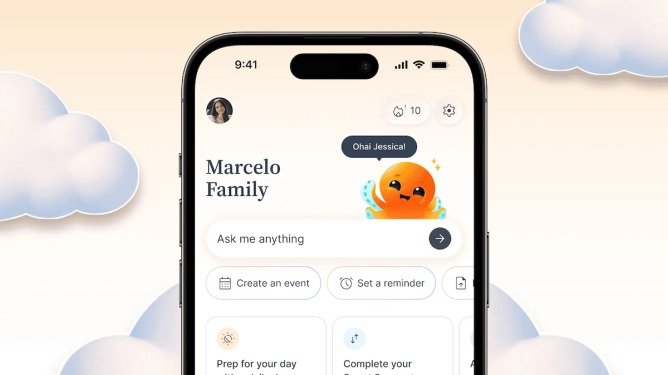
9. Ohai
Ohai is another AI assistant designed for families. It helps organise household calendars, chores, meal plans and other responsibilities that can become difficult to manage when information is spread across several apps.
Users can send messages, forward emails or make voice requests. Ohai then helps turn those details into schedules and reminders. It offers a free basic option, alongside paid plans that were listed as starting at $9.99 per month.
10. Ollie
Ollie helps families bring information from school messages, emails, calendars and task lists into one organised system. Its aim is to make sure important dates and responsibilities do not get lost in busy conversations.
The assistant can track family activities and send relevant details through text messages. One feature that sets Ollie apart is its reported SOC 2 compliance, a recognised standard for managing information securely. TechCrunch listed a free option and paid plans starting at $25 per month.
11. Orbits
Orbits is an AI assistant focused on managing household tasks. It can bring together calendars, lists and conversations while helping users complete tasks such as searching online, booking restaurants and requesting quotes from service providers.
It can also remind family members about chores and help coordinate household responsibilities. For someone managing a home, the ability to keep schedules, service bookings and reminders in one place could save time and reduce confusion.
12. Pally
Pally helps users manage information spread across services such as WhatsApp, Gmail, Google Calendar and Google Drive. It can help keep track of plans, receipts, important dates and files without requiring users to search through several apps manually.
You can interact with Pally through conversations and give it access to the services you use. It also offers calling features. Its free plan includes limited calling time, while paid options provide more minutes and additional use.
13. Poke
Poke is a general-purpose AI assistant that can help with calendars, planning, health and fitness routines, smart-home controls and other everyday activities. Users can contact it through text messages rather than relying entirely on a separate app.
The idea is to make AI assistance available when you need it, whether you want help organising your day or managing a routine. Poke became notable after Apple approved it for the Apple Messages for Business platform in June 2026. Its parent company, The Interaction Company of California, was later acquired by AI coding startup Cognition in a deal reported to be worth a low nine-figure amount.
14. Rene
Rene is an AI personal assistant designed to work through iMessage, Telegram and WhatsApp. It can turn ordinary messages into reminders, tasks, summaries and follow-up actions.
Rene also has a browser and can help with shopping, writing code, creating slides and making images. This makes it useful for people who want to handle several types of work from one assistant. Instead of opening different tools for every small task, users can send instructions through a conversation.
15. Stanley
Stanley is designed for content creators, social media managers and people who publish content regularly. It helps users come up with ideas, turn those ideas into posts and keep a consistent publishing schedule.
For example, Stanley can use information from a connected Instagram account to suggest content based on what a creator has been doing. Users can also send voice notes and turn them into scripts or captions. It includes a content calendar and post scheduling features, making it relevant for businesses that want to maintain an active online presence.
16. Szn
Szn helps users manage tasks and follow-ups through one conversation. It accepts text messages, voice notes, photos and forwarded emails, then helps carry out actions such as making calls, sending emails and following up on requests.
This could be useful for small businesses and busy professionals who need help keeping track of customers, appointments and unfinished work. Szn’s website reports that the service has supported thousands of businesses across multiple countries, although users should check its current features and availability before relying on it for important business tasks.
17. Tab
Tab allows users to delegate everyday tasks through iMessage or WhatsApp. Requests can include finding a birthday gift, ordering groceries or looking for a suitable product.
The goal is to let users explain what they need in a message and have the assistant handle the next steps. Tab emerged from stealth in October 2026 with a reported valuation of $300 million. Its investors include SV Angel, Valar Ventures and American Spirit.
18. Tomo
Tomo offers a personal assistant that can take part in group conversations through iMessage. This makes it different from assistants that only work in private chats with one user.
It can help with scheduling, reminders, personal goals and accountability. It also supports tasks such as searching the web, working with calendars and email, watching videos and editing photos. Its group chat features may be helpful for friends planning an event or colleagues trying to coordinate their schedules.
19. Town
Town focuses on professional work. It gives users an AI assistant called a Townie, designed to learn how they work and help with recurring tasks.
It can connect to tools such as email, calendars, documents and Slack. This could help professionals manage routine work, organise information and spend less time switching between services. Town raised a $55 million Series A in June 2026, with Andreessen Horowitz and Forerunner leading the round.
20. Wajo
Wajo is building AI agents that can interact with people and businesses to complete tasks. Its first consumer agent, Fo, can call businesses, send emails, join group chats, make bookings and help with purchases.
Fo has its own email address, phone number and payment card, allowing it to interact with businesses without always needing access to a user’s personal accounts. Wajo also says it can bring in a human assistant when the AI cannot complete a task on its own. It offers a free tier, while heavier workloads and custom agents are available through a paid Pro option.
How to Choose the Right AI Agent
The best AI agent depends on the tasks you want to complete. If you need help with family schedules, Fambot and Ohai may be worth exploring. If your main concern is work and personal productivity, options such as Folk, Martin and Comma offer broader support.
Content creators may find Stanley more useful because it focuses on content ideas, captions and publishing schedules. Frequent travellers may prefer Miso, while people who want help with household tasks can look at Orbits. Before signing up, check which messaging platforms the assistant supports and whether it works in your country.
You should also check the price, privacy policy and permissions it requests. Some agents may need access to your email, calendar, files or other personal information to complete tasks. Start with simple requests and avoid giving an AI agent access to sensitive accounts or permission to spend money until you understand how it works.
Are AI Agents Better Than Ordinary Chatbots?
Ordinary chatbots are useful when you want explanations, ideas or answers to questions. AI agents go a step further by connecting to services and taking actions, such as adding calendar events, sending messages or organising a trip.
However, AI agents are not perfect. They can misunderstand instructions, make mistakes or take an action you did not intend if their permissions are too broad. You should review important actions, especially those involving payments, private information, bookings or messages sent to other people.
Another important difference is that not every AI agent supports every messaging platform. Some work through WhatsApp, while others depend on iMessage, SMS, Telegram or a dedicated app. Always confirm the supported platforms and availability before choosing one.
The Bottom Line
AI agents are changing how people interact with software. Instead of opening a different app for every task, users can increasingly send a message and ask an assistant to help get the work done. From organising family schedules to managing professional tasks and planning trips, these tools are becoming more practical.
Still, the most useful AI agent is not necessarily the one with the most features or the biggest valuation. It is the one that solves a problem you face regularly, works with the services you already use and fits your budget.
Start with one task you find stressful or time-consuming, test an assistant that handles it, and check its results before trusting it with more responsibility. That is a simple way to find out whether an AI agent can genuinely make your life or business easier.